As an Amazon Associate, we earn from qualifying purchases.
Start with the problem you want to solve. Check the fit before buying a complete setup.
Find a chair that fits · Compare walking pads · Save your workspace measurements
| Category | Consider it when | Check before buying |
|---|---|---|
| Ergonomic Chair | Chair does not adjust to fit you | Seat depth, back support and usable adjustments |
| Monitor Arm | Screen stand cannot reach a comfortable position | Monitor weight, VESA mount and clamp compatibility |
| Blue Light Glasses | You specifically want tinted lenses | Optional; do not assume they relieve eye strain or improve sleep |
| Desk Mat | You want surface protection | Desk dimensions and a comfortable edge |
| Anti-Fatigue Mat | Standing feels uncomfortable on your floor | Optional comfort aid; keep the surface stable |
| Category | Consider it when | Check before buying |
|---|---|---|
| Standing Desk | You want to alternate sitting and standing | Minimum and maximum working height for your body |
| Monitor | Current screen is hard to read | Text size, viewing distance and usable desk depth |
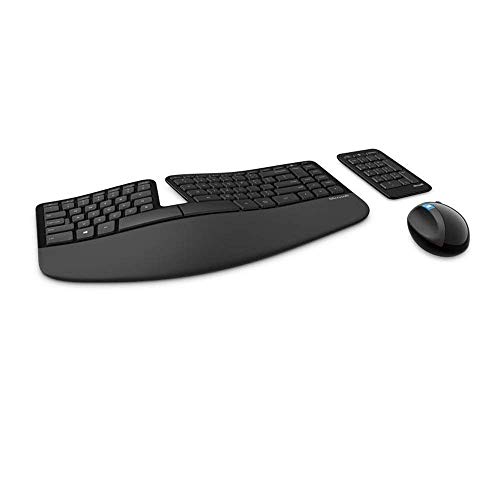
| Ergonomic Keyboard | Keyboard position leaves wrists bent | Layout, reach and ability to trial the keyboard |
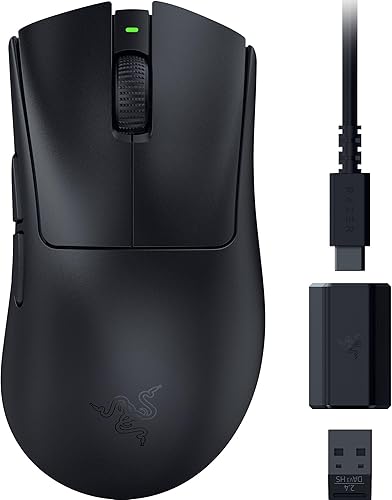
| Ergonomic Mouse | Current mouse is uncomfortable to grip | Hand size, grip and return policy |
| Desk Lamp | You need light on paper or the keyboard | Place it to avoid reflected screen glare |
| Category | Consider it when | Check before buying |
|---|---|---|
| Walking Pad | You want to try walking during suitable tasks | Belt size, capacity, noise and storage |
| Standing Desk (walking pad height) | You will stand on a raised walking belt | Measure working height while on the pad; no universal desk height fits all |
| Under-Desk Bike | You prefer seated movement | Check knee clearance through the complete pedal stroke |
| Massage Gun | You want a separate massage tool | Optional; not a workstation requirement or pain treatment |
| Daylight Lamp | You are considering a light-therapy device | Read the evidence and precautions; separate it from ordinary task lighting |
The best ergonomic home-office setup is one that fits your body, room and work. Start with the adjustment you need, then buy only if your existing equipment cannot provide it. The author uses a home-office setup and walking pads; that experience informs the practical questions here, but it does not establish a medical benefit or a measured productivity gain.
Which Home-Office Upgrade Should Come First?
- Your chair does not fit: compare seat dimensions and adjustments.
- Your screen is awkward to read: adjust its stand and text size, then check monitor-arm compatibility if the stand cannot reach a comfortable position.
- You want to change position: compare sit-stand desks by height range.
- You want to try walking while working: start with desk height measured on the walking pad, then compare pad dimensions and storage.
- Conversation distracts you: compare Loop models by whether you need to hear people.
The tables above are a menu of possible upgrades, not a shopping list. A chair and a walking pad solve different problems; neither is automatically the first purchase.
Measure Before Buying
Use our free workspace checklist to save your available desk space and setup checks on your device, or print them for shopping.
- Record the usable desktop width and depth, including the space occupied by your keyboard and screen.
- Check that the chair and desk allow comfortable leg clearance and access to the keyboard.
- For a monitor arm, check the screen’s weight and mounting pattern against the arm, plus the desk edge against the clamp.
- For a walking pad, include the belt height when measuring your working height. Check storage space, power-cord routing and the manufacturer’s clearance instructions.
Adjust the Setup You Already Own
The OSHA workstation checklist covers supported sitting, room for legs, comfortable keyboard and mouse placement, and a screen top at or below eye level. It also recommends opportunities to vary tasks and take short breaks. These are fit checks, not guarantees against pain or injury.
Try adjusting your chair, moving the mouse closer, enlarging text and repositioning the monitor before ordering equipment. A laptop used as both screen and keyboard limits independent adjustment; an external keyboard and a stable riser may be worth considering when that is your specific constraint.
Chair or Standing Desk?
Choose a chair when your current seat cannot provide the dimensions or adjustment you need. Choose a sit-stand desk when you need a different work-surface height or want the option to change position. If you keep the desk, compare converters against the added height and space they occupy.
Check the seated minimum as carefully as the standing maximum. A desk that rises high enough can still be too tall at its lowest setting. A standing desk also does not remove the need for a seat that fits during seated work.
Screen, Keyboard, Mouse and Lighting
Use the workspace checklist to record your screen position and space, then compare the keyboard and mouse guides cover alternative layouts and grips. Different shapes are options to trial; they do not guarantee prevention of repetitive-strain injuries.
Use a desk lamp for the task surface while checking for glare. Blue-light glasses and light-therapy lamps are separate decisions with their own evidence limitations; neither belongs in every starter setup. A desk mat is primarily a surface and preference choice.
Walking Pad, Desk Bike or Breaks?
A walking pad is an optional way to add movement during tasks you can comfortably perform while walking. Try short sessions at a comfortable pace, and stop walking for tasks that need steadier control. We have not measured a daily-mileage target or proven that working while walking preserves productivity.
- Walking pad: compare belt size, capacity, storage and noise considerations. Check the combined desk-and-pad height before buying either.
- Seated pedaling: an under-desk bike needs room for your knees through the full pedal movement. It does not fit every desk.
- Standing variation: review stability before considering a balance board. An anti-fatigue mat is optional, and should not interfere with the chair or pad.
- No extra equipment: stepping away for movement breaks remains an option.
Cables and Optional Accessories
Use cable management to keep the work area clear and allow enough slack through the desk’s full travel. Test the travel before placing equipment where a cable could pull it over.
Massage guns, foam rollers and posture correctors are optional topics, not required finishing pieces. A buying guide cannot diagnose persistent pain or establish that a recovery tool will treat its cause.
When to Skip a Full Setup
- Your equipment already fits: keep it and adjust your routine as needed.
- You work in temporary or shared space: check whether equipment can be installed and stored before choosing permanent furniture.
- You need an accommodation or have persistent symptoms: seek individualized guidance; use the resulting requirements to guide purchases.
Honest Limitations
This is a planning guide, not a clinical ranking of upgrades. We have not tested every linked product as one integrated room or measured a universal build order. Personal use does not prove that a particular purchase improves pain, sleep or productivity.
How We Selected These Options
We combined the author’s experience using a home office and walking pads with OSHA’s workstation fit checklist and the practical compatibility questions in our category guides. The recommendations here prioritize solving an identified fit problem. Prices, stock, specifications and return policies should be checked for the exact item before purchase.
Frequently Asked Questions
What is the best first upgrade?
The one that resolves a fit limitation you cannot adjust away. It may be a chair, screen support or different work-surface height. There is no single first purchase for every desk worker.
Do I need a chair with a standing desk?
If you also sit at the desk, you still need a seat and seated working height that fit.
Is a walking pad necessary?
No. Compare one if you want to try walking during suitable tasks and have the space and desk height. Movement breaks do not require a pad.
Should I buy everything at once?
Start with one identified limitation. Check the result before buying the next item, particularly if several products must fit together.